 Gabi Knits
Smart PDF chart reader for knitting
Always know which row you’re on.
Open a PDF pattern, tap the chart and just knit. Gabi Knits counts the rows for you and guides you smoothly, step by step, through the whole pattern. Everything you need is here: smart counters, the key always at hand and a drawing tool that lets you add your own notes and touch up the chart with the correction pen – on your phone, tablet and e-ink reader.

- Phone, tablet and e-ink
- No account, no ads
It finds the chart for you
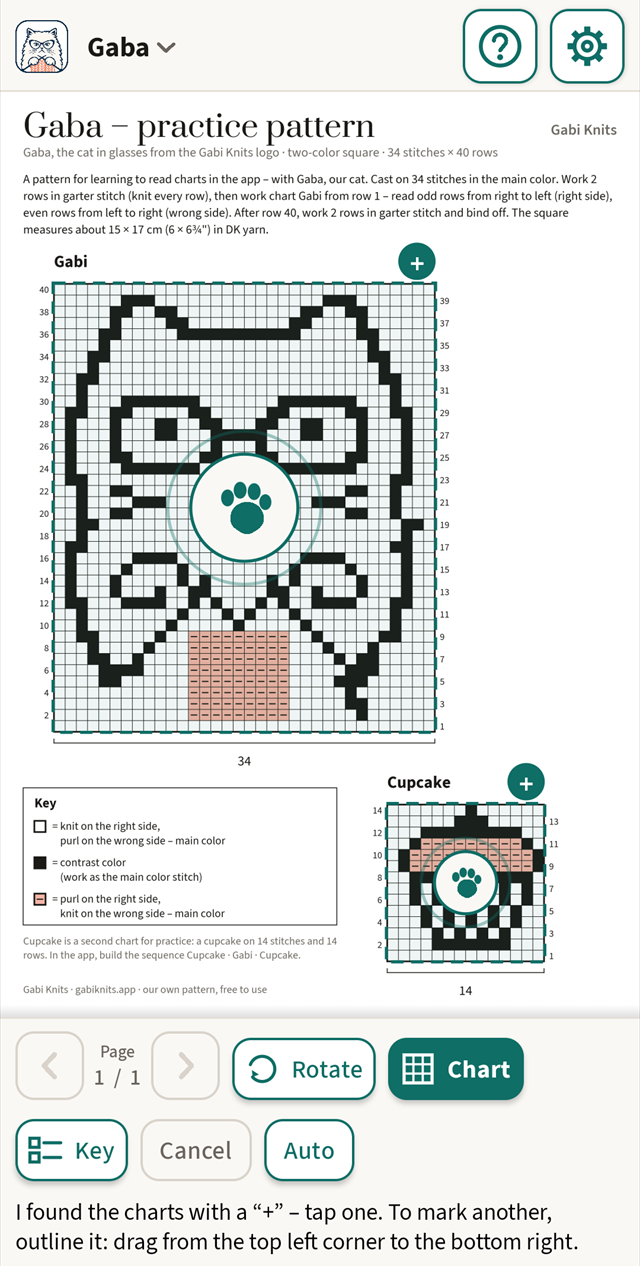
Tap the chart and the app finds its frame and grid and counts the rows itself. On a page with several charts it suggests the frames. You only check.
Guides you row by row
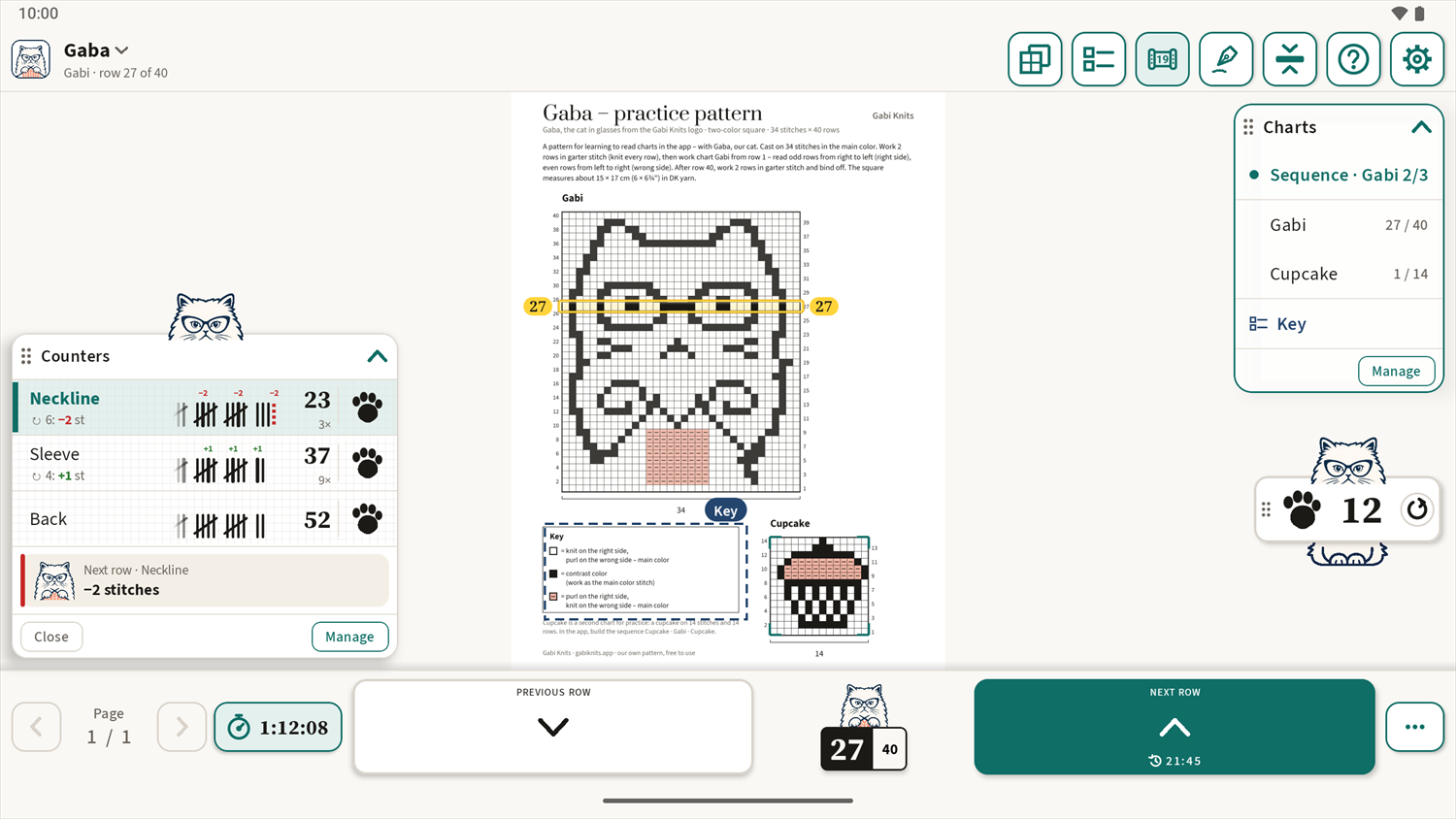
The current row is highlighted, with its number on both sides, and the screen stays on. One big “Next row” button – handy when your other hand holds the needles.
Counters on the page
You can use a simple row counter with Gaba’s paw – one tap is +1. Named counters keep track of cycles and remind you one row ahead what to do.
Phone, tablet and e-ink
Each screen gets its own layout. Colour and smooth motion on phones and tablets, calm black and white and large buttons on an e-ink reader.
Made with needles in hand
Gaba tests every version on her own knitting.
One tap is enough
You don’t outline the chart or type in how many rows it has. You tap it, and Gabi Knits finds the frame and grid – on a page with several charts it marks them for you. This works without buying, too.
Calm on e-ink
Gabi Knits was born on a BOOX e-ink reader and has its own look there: black on white, a thick frame on the row, no animations and large buttons. We test every version on it.
The whole pattern in order
Arrange the charts in a sequence, for example Cupcake · Gabi · Cupcake. An arrow takes you to the next chart and its page, and each one remembers its own row.
Your row, always in the middle
The chart moves under a fixed bar, so the row you are knitting doesn’t drift to the edge of the screen. No searching for where you are.
How it works
Three steps from a PDF to your needles.
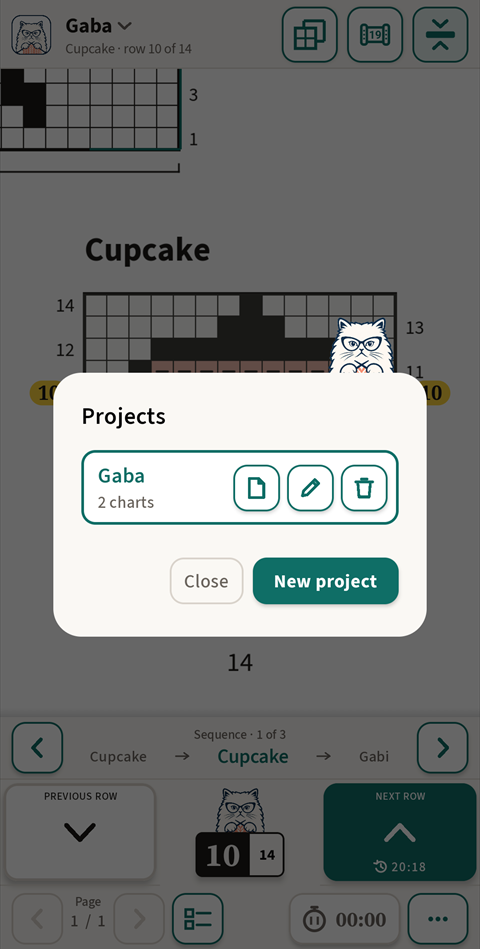
Open your PDF pattern
Tap “Projects”, then “New project”, and pick the file. The project gets its own name and remembers where you are.
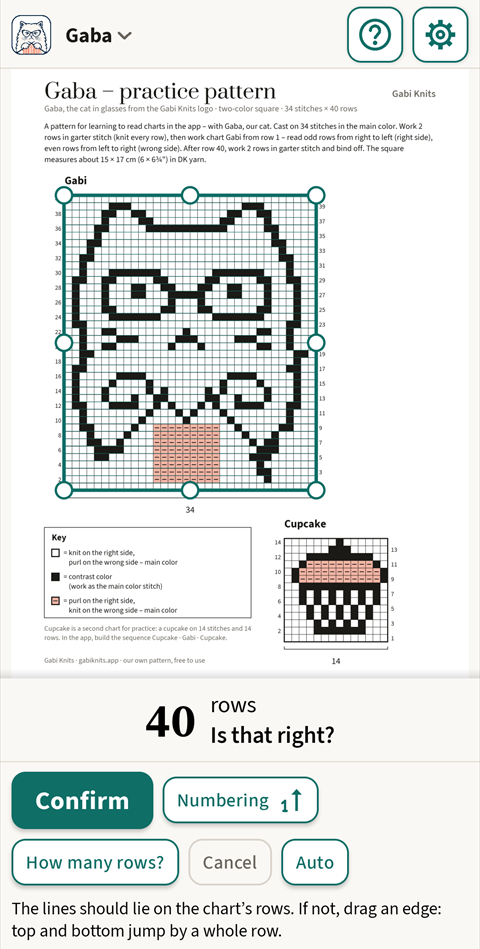
Tap the chart
Gabi Knits finds the chart’s frame and grid, counts the rows and asks you to check them. You can adjust the edges with the handles.
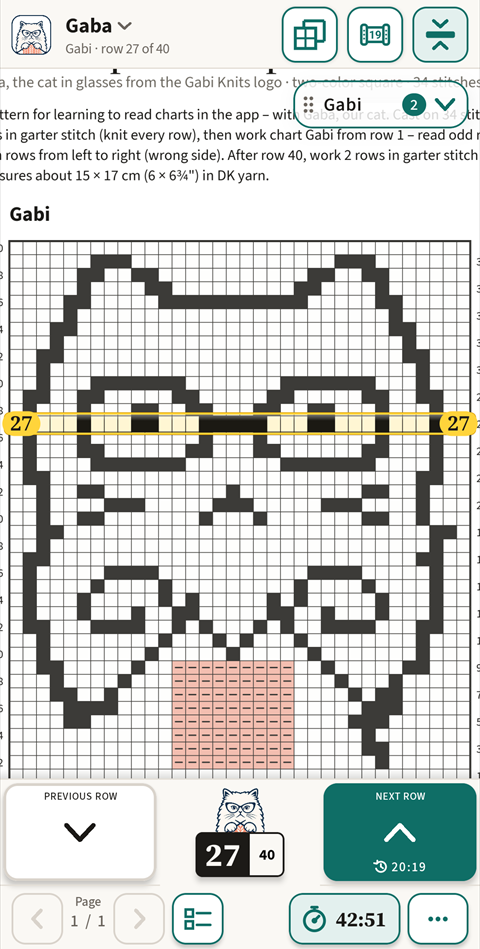
Knit row by row
The current row is clearly marked and the counter shows “Row 14 of 40”. “Next row” moves on, “Previous row” goes back.
New: counters
Count everything, not just the chart
A project is more than one chart. Counters sit right on the page, next to your pattern – use them to count rows of stockinette from the written pattern, repeats and decreases.
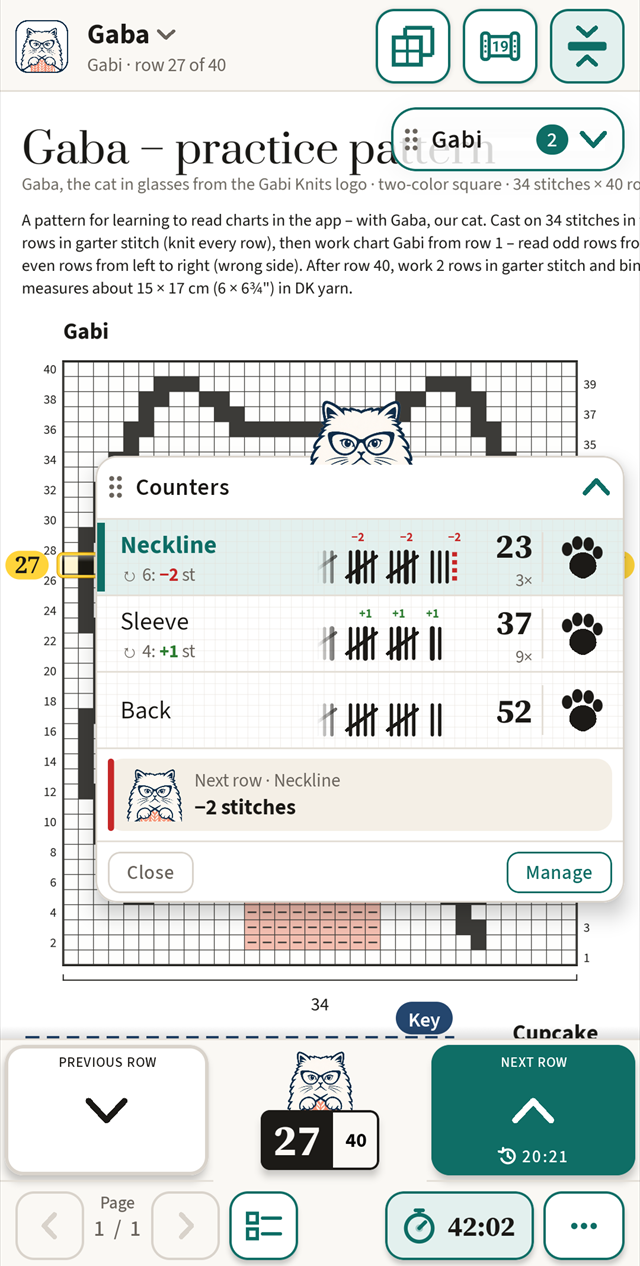
Counter – one tap
A simple counter on the page: tap Gaba’s paw to add 1, hold it to take 1 away. Turn it on in the top bar – each project keeps its own count.
Counters with names
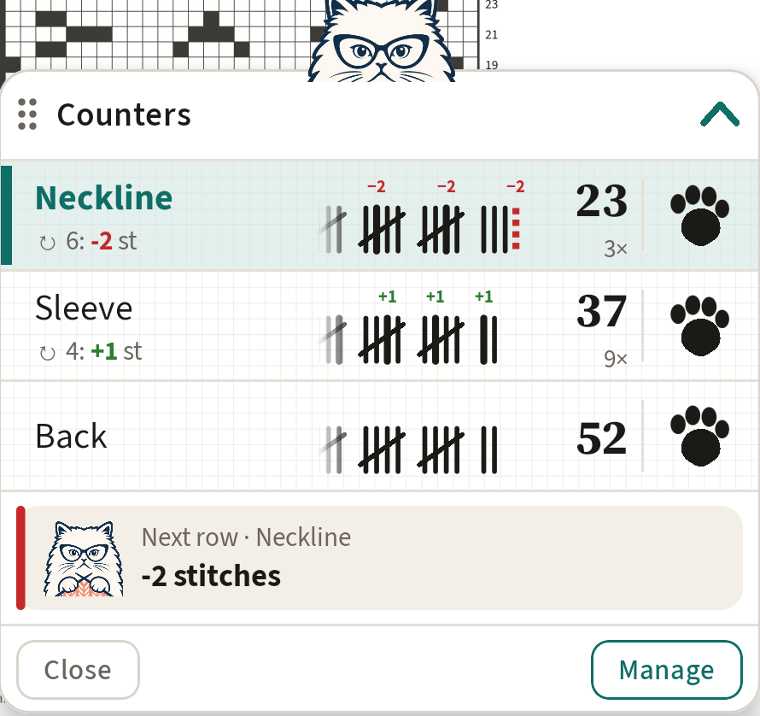
Up to eight counters with your own names – Neckline, Sleeve, Back. Tally marks like in a notebook, in groups of five, so you see the number at a glance.
“Every 6 rows: −2 stitches”
Give a counter a repeat and Gaba reminds you one row before. Marks above the tallies show where it happened, and “3×” how many times.
There when you need them
Counters with names stay hidden until you need them – the “Counters” button shows them. Hide the widget with one tap whenever you want the whole page.
What it can do
Only what helps you get through the row – nothing that gets in the way.
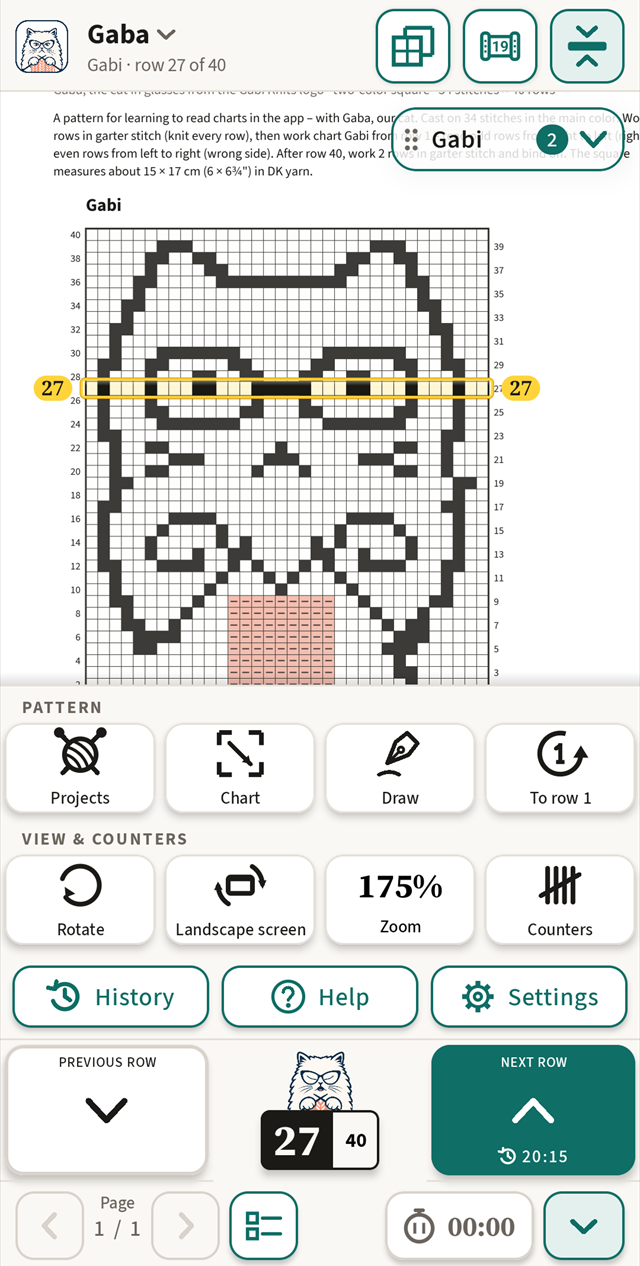
Draw on the pattern
Circle your size, note a change or mark where you paused. The pen has four colours and two widths, the eraser removes a line, and your drawing saves itself in the project – the PDF stays untouched.
The key at hand
Mark the pattern key once. It opens with one tap, or stays “on top” in a small window you can move and resize – while you keep knitting.
Several charts in one pattern
Each chart remembers its own row. Switch with the ‹ › arrows on the bar by the row counter – one tap, page uncovered – or with the floating widget.
Row in the middle of the screen
The chart moves under a fixed bar, so the row you are knitting stays in the middle of the screen.
Knitting timer
See how long a project took. It runs only when you turn it on – also in a project without a chart – and stops by itself when you leave the app.
A guided first project
On first start, a short tutorial walks you step by step through the practice pattern “Gaba” – Gaba the cat in glasses and a cupcake. You can knit this pattern all the way through without buying.
Progress saves itself
Each project has a name and notes – needles, size, changes – and remembers its page, charts, rows and knitting time. The row history shows your latest moves.
Seven languages
English, Polish, Czech, German, Norwegian, Danish and Swedish – each with the pattern vocabulary of its language.
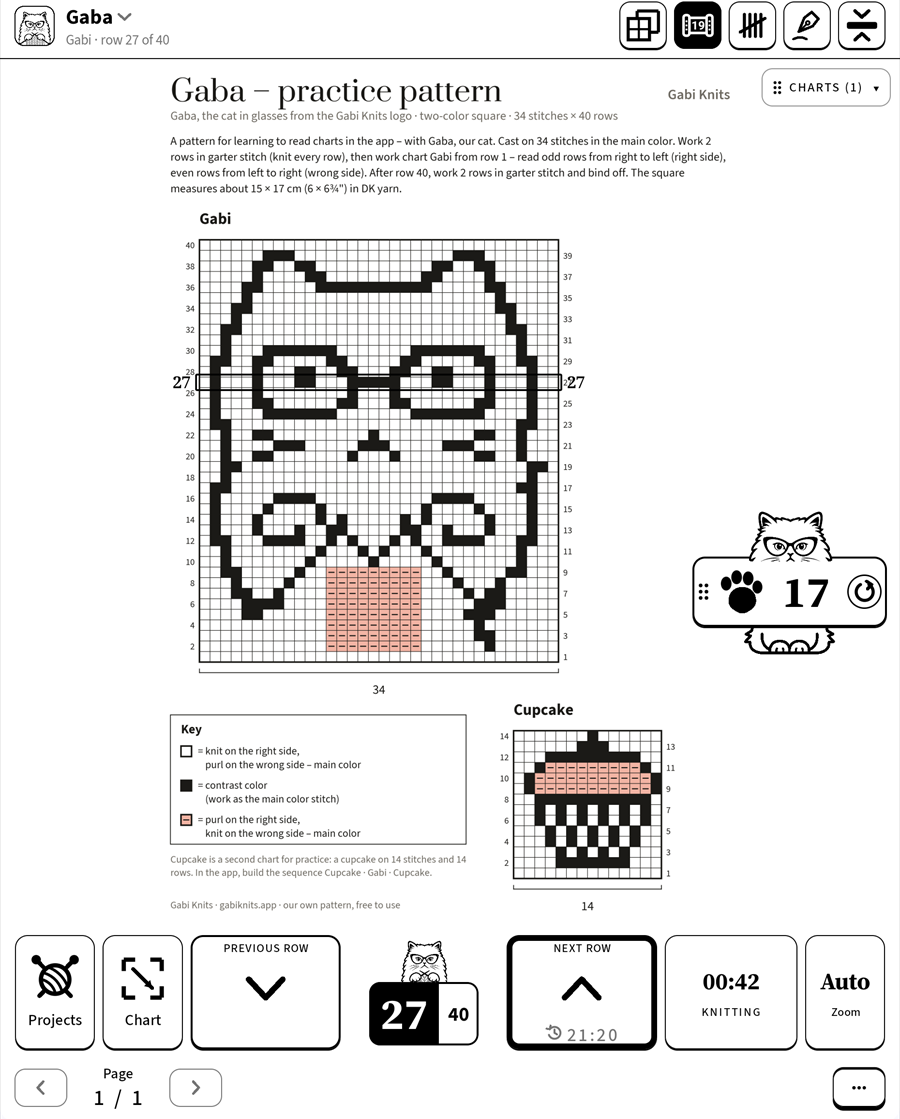
For BOOX e-ink tablets
Designed for e-ink from day one
Gabi Knits began on a BOOX Note Air, and that is where every version is tested. On e-ink the screen stays calm: black on white, nothing moving and nothing that depends on colour. On phones and regular tablets the same app uses colour and smooth movement.
A thick frame, not colour
The current row gets a bold black frame, so it stands out on a black-and-white screen.
No animations
Pages and rows change in a single step. The e-ink screen refreshes less often and flickers less – easier on the battery and your eyes.
Large buttons and numbers
Big row buttons and row numbers you can read from your knitting.
Tested on BOOX Note Air
Runs on BOOX tablets with Google Play, in portrait and landscape.
On phone, tablet and e-ink
One app with a layout for each screen: phone, tablet and e-ink reader. Portrait or landscape, zoom from 100 to 500% or Auto, and the page can be rotated when a chart lies sideways.
Price
Yearly
Forever
One free trial per Google account. Prices are in euro; Google Play shows the price in your currency. Cancel the yearly subscription any time in Google Play. You can knit the practice pattern “Gaba” all the way through without buying.
Your patterns stay with you
Your PDF patterns, projects and row numbers stay on your device. The app uses the Internet only to handle a purchase and check that you have access – and without a connection you simply keep knitting.
Read the privacy policy- No account
- No ads
- No tracking or analytics
- Works without Internet
Questions
What will Gabi Knits do for me?
You tap the chart, and Gabi Knits finds its frame, counts the rows and guides you row by row – you don’t outline or type in anything, and on a page with several charts it marks them for you. You arrange the pattern’s charts in a sequence, the current row stays in the middle of the screen, and on an e-ink reader the app has its own calm look. Finding charts works without buying, too.
Who is behind Gabi Knits?
Gaba – a knitter who runs Gang Motków Gaby on Facebook. The app was made for her, for her e-ink reader, and the first version was called “Motek Gaby”. Gaba tests every version on her own knitting and reads the messages herself. The cat in glasses in the logo is Gaba, drawn as a cartoon.
Which patterns work?
PDF patterns with a chart drawn on a grid, from many publishers and designers. The app is tested on hundreds of charts; it finds the grid and rows itself, and you can adjust the edges with the handles. A pattern without a chart is useful too – count rows from the written pattern with the paw counter.
Can I open a pattern from Ravelry?
Yes. Download the pattern from Ravelry as a PDF file, then in Gabi Knits tap “Projects” → “New project” and pick that file. The app doesn’t connect to Ravelry – it works with the file on your device.
Can I write on the pattern?
Yes. Tap “Draw” – circle your size or note a stitch change with the pen and remove a line with the eraser. With a stylus, the stylus draws and a finger moves the page. The drawing saves itself in the project, and the PDF file stays unchanged. On an e-ink reader the pen draws in black.
Can I count rows without a chart?
Yes. Turn on the Counter in the top bar – one tap on the paw is +1, holding it is −1. For several counts at once, like neckline and sleeve, use counters with names – the “Counters” button shows them.
Which devices does it run on?
Android 8.1 or newer: phones, tablets and BOOX e-ink readers with Google Play.
Do I need an account?
No. There is no sign-up and no login. Purchases go through your Google Play account.
Does it work without Internet?
Yes. Reading patterns and knitting never need the Internet. A connection is needed only to buy and, now and then, to confirm your subscription.
What can I do without buying?
Knit the practice pattern “Gaba” all the way through, add your own patterns, browse the pages, draw on them and mark charts – on your own pattern, row 1 as well. Further rows need the free trial or a purchase.
I have a new phone. Do I pay again?
No. Install Gabi Knits with the same Google account and tap “Restore purchases”.
How do I cancel the subscription?
In Google Play: Payments & subscriptions → Subscriptions. Your projects stay where they are.
Is there an iPhone or iPad version?
In the works…
Knit your next row with Gabi Knits
A year with 7 days free, or one payment for good. No account and no ads.
Questions? Write to Gaba: contact@gabiknits.app
Enjoying Gabi Knits?
It’s a voluntary tip – every coffee tells Gaba it’s worth making the app even better.